
TIME TO GET REAL TOY CONTROL
Select or Create Your Pattern. Control the Time.
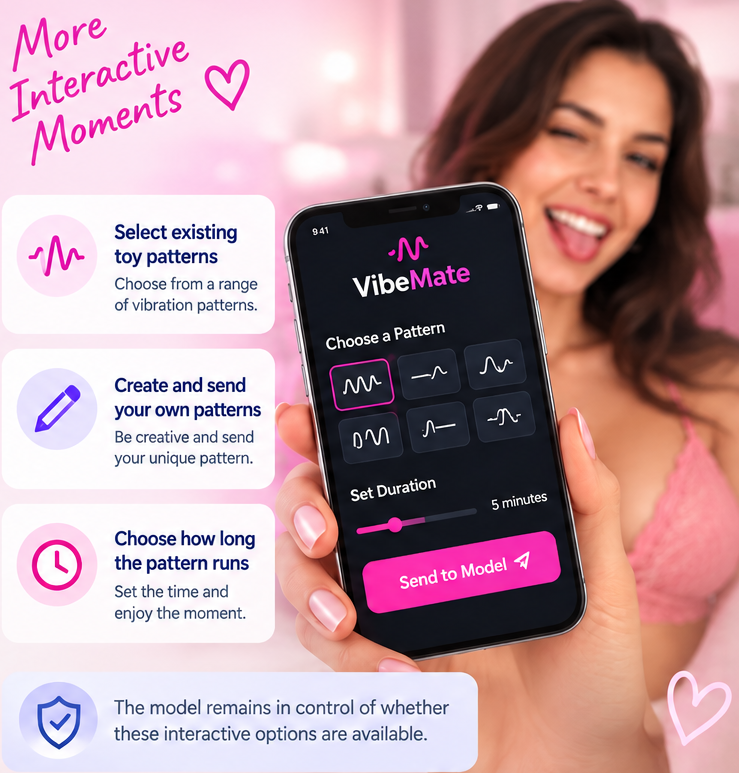
Using VibeMate with cam models gives you more control over interactive toy play. Select an existing pattern, create your own, and control how long it runs — within the options the model makes available.
New to VibeMate? Get 30 free Chaturbate tokens when you get started.
Limited-time offer. Eligibility and availability may change.
Don’t have a Chaturbate account? Create one free ?
What Changes When You Use VibeMate?
Standard toy control lets you interact with a cam model’s toy. You tip, the model gives you a control link. Installing the VibeMate browser extension gives you the tools to make that interaction much more personal, effective and enjoyable.
Standard toy control lets you interact with a cam model’s toy. You tip, the model gives you control, and you use the controls provided. VibeMate gives you the tools to make that interaction far more personal. Choose from a huge library of patterns, create your own signature patterns, save your favourites to a playlist and have them ready whenever you get toy control.
The Real Vibemate Difference? Maximum Pleasure Delivered.
Want models to be very happy when you enter their room?
Imagine having the power to deliver patterns that get the reaction you are hoping for, that’s the VibeMate difference. You didn’t just pay for the interaction — you create it and models will notice. VibeMate Changes the Experience

Ready to Try Vibemate?
Download VibeMate, find a model with a compatible interactive toy and discover what happens when you send patterns that hit exactly the right notes. Find what she likes, save it to your playlist and be ready to deliver it again next time. Get it right and don’t be surprised if you’re welcomed back time and time again.
Want to Go Further With VibeMate?
Getting VibeMate is only the start. Learn how to use it properly, find models offering interactive toy control, or explore compatible toys if you want to bring VibeMate into your own play.
How to Use VibeMate
Learn how to set up VibeMate, connect to a cam platform, use patterns and playlists, control a toy and get more from your control time.
Find VibeMate Models
Find cam models using compatible interactive toys, see where they stream and discover who may offer VibeMate toy control.
Find Compatible Toys
Looking for an interactive toy for yourself, your partner or a favourite model? Compare compatible toys and find the one that suits how you want to play.
Using VibeMate With Cam Models: Common Questions
Does VibeMate Work With Every Cam Model?
No. The model needs to be using a compatible interactive toy and have the relevant interaction available. Even if a model owns a compatible toy, she may not have VibeMate enabled or may choose not to offer toy control at that time. You can browse our Discover Web Cam Models pages to find models using interactive toys and see where they currently stream.
Does the Model Have to Enable VibeMate?
Yes. VibeMate doesn’t override the model’s control of her interactive toy. The model decides whether toy interaction is available and can choose whether to start or continue a control session. VibeMate gives you more options within the interaction she makes available.
Can I Create My Own Toy Patterns?
Yes — and this is one of VibeMate’s biggest advantages. You can choose existing patterns or create your own, save the patterns you like to your playlist and have them ready for future toy-control sessions.
Find a pattern that gets a great reaction from a model and you can save it, refine it and bring it back the next time you visit her room.
Can I Use VibeMate Hands-Free?
Yes. Save your favourite patterns to a playlist and use them during compatible toy-control sessions. Instead of manually operating the controls for the entire interaction, you can select a pattern and let it run.
That makes hands-free play one of VibeMate’s most useful benefits — especially once you’ve built a collection of patterns you already know a model enjoys.
Does VibeMate Work Differently on Mobile and Desktop?
Yes. On desktop, toy-control sessions are generally started by the model, who sends you an activation link after you tip for control time. Once the session starts, you can access your saved VibeMate patterns and playlist.
On mobile, VibeMate offers additional ways to initiate interaction, including sending a saved pattern or starting a Live control session. The exact workflow is different, so we’ll cover mobile and desktop setup in our dedicated How to Use VibeMate guide.
How Much Does VibeMate Toy Control Cost?
The cost depends on how the model has her VibeMate interaction configured. As a guide, desktop/browser control commonly uses a default rate of around 100 Chaturbate tokens per minute, while mobile Live control commonly starts around 50 tokens per minute. Models can change these rates.
You may also be able to extend an active control session by tipping for additional time. Always check the price shown before starting or extending a session.
Find a VibeMate Enabled Model
VibeMate now ready to go? Once you know how to use VibeMate with a cam model, the next step is finding someone to try it with. Here are the latest cam models we’ve identified as offering VibeMate-compatible interactive toy control. Here are the latest cam models we’ve identified as offering VibeMate-compatible interactive toy control. Note: VibeMate availability can change, so its a good idea to check that interactive toy control is available when you enter the model’s room.