
From Download to Toy Control
Learning how to use VibeMate with a cam model is straightforward. Once you’re set up, you can build playlists, create your own patterns and have them ready to use during compatible toy-control sessions.
The available controls can vary by platform, model and how the toy is configured, so we’ll show you what each option actually does rather than assume every room works exactly the same way.
*New to VibeMate? Get 30 free Chaturbate tokens when you get started. **
*Limited-time offer. Eligibility and availability may change.
Don’t have a Chaturbate account? Create one free ?
Not sure whether VibeMate is worth using? Read Why Use VibeMate With Cam Models?
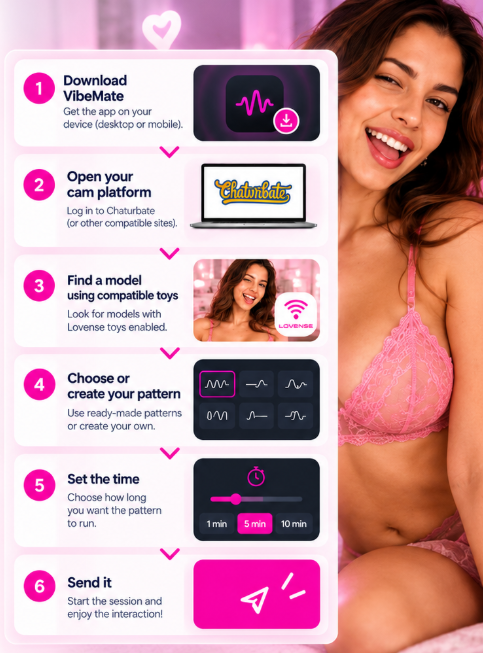
1. Download and Set Up VibeMate
Start by downloading VibeMate and getting it set up on the device you want to use for cam viewing.
Desktop / PC: Install the VibeMate browser extension, then open your cam platform in the browser with the extension enabled.
Mobile: Install the VibeMate app. Open VibeMate first, then browse to your cam platform from inside the app.
Sign in to your cam account as normal. Before you start looking for a toy-control session, there’s something worth doing first: build your pattern playlist.
2. Explore the Pattern Library and Build Your Playlist
Before you start a toy-control session, spend some time exploring VibeMate’s pattern library. You’ll find ready-made patterns you can use without having to create anything yourself.
Try different patterns and save the ones you like to your playlist. Your playlist becomes your ready-to-use collection, so when you get toy control you can quickly choose a pattern instead of searching for one during the session.
ToyMaster Tip: Build your playlist before you need it. Your control time is much better spent using patterns than looking for them.
3. Create Your Own Patterns and Add Them to Your Playlist
The pattern library is a good starting point, but VibeMate also lets you create your own patterns. This is where you can make the interaction more personal.
Experiment with your own pattern, save it when you’re happy with it, then add it to your playlist alongside the ready-made patterns you’ve already selected.
ToyMaster Tip: Your playlist can contain both VibeMate patterns and your own creations — ready to use whenever you get toy control.
4. Use Your Patterns in a Toy-Control Session
Now you’re ready to use VibeMate with a live model. Find a model using a compatible interactive toy and start a toy-control session using the options available in her room. Once your control session is active, open your playlist and choose one of the patterns you’ve saved. You can use a pattern from the VibeMate library or one you’ve created yourself.
ToyMaster – Once a saved pattern is running, you can let it do the work rather than manually controlling the toy – totally Hands Free.
5. Go Play
You Now Know Enough to Start Using VibeMate for a better toy control experience with a cam model.
That’s the basic VibeMate workflow: get set up, build a playlist, create your own patterns and use them when you get toy control with a compatible model.
Once you’ve used it a few times, you’ll probably start asking different questions: Which patterns work best? How can I get more from my control time? Am I spending more tokens than I need to? What’s the best way to use the different control options?
Want to Go Pro? Meet the ToyMaster
If you want to go beyond basic setup of how to use VibeMate with a cam model and see how to use it like a boss — better patterns, smarter control sessions, better use of your tokens and new techniques as VibeMate, adult toys and web cam platforms continue to evolve and change.
Find a VibeMate Enabled Model
VibeMate now ready to go? Once you know how to use VibeMate with a cam model, the next step is finding someone to try it with. Here are the latest cam models we’ve identified as offering VibeMate-compatible interactive toy control. Here are the latest cam models we’ve identified as offering VibeMate-compatible interactive toy control. Note: VibeMate availability can change, so its a good idea to check that interactive toy control is available when you enter the model’s room.